How I learned Game Dev to make DINGO
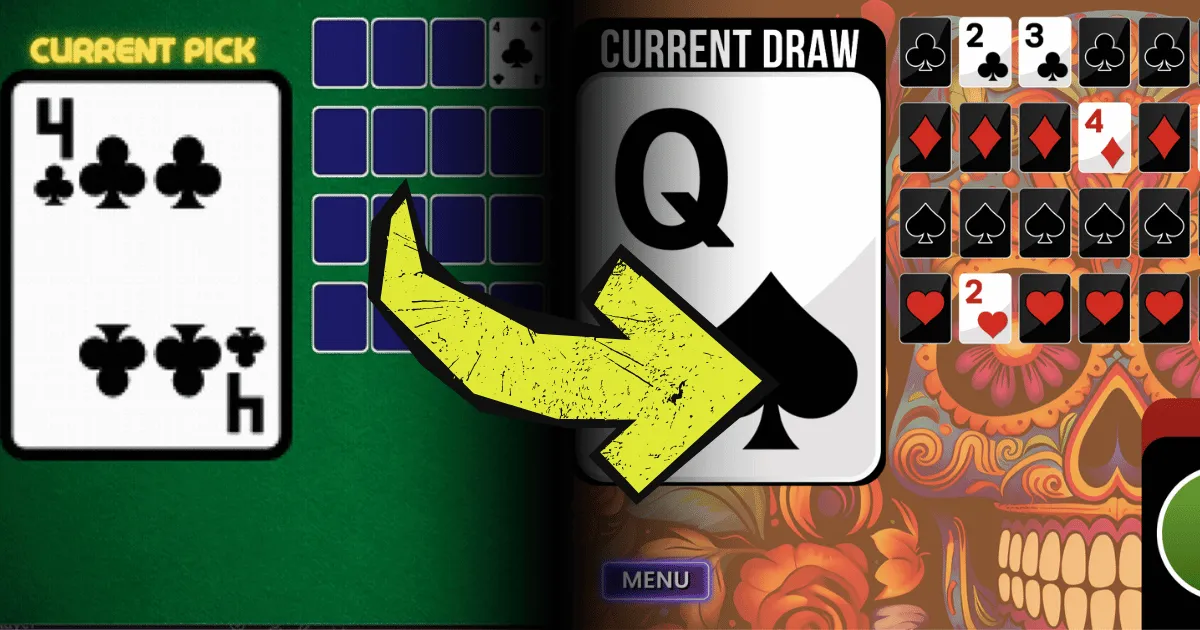
This is a story about how my idea of a modern Deaf bingo game software came to be.
You can check out the DINGO! app here.
What is DINGO?
♥️♠️♦️♣️ DINGO, or “Deaf bingo”, offers a fresh take on the classic game of BINGO.
While traditional bingo may evoke memories of a bygone era, DINGO brings a modern twist to the game.

The Deaf community has adopted a friendlier, more hip way of playing a game among large numbers of people without the clutter of bingo cards, chips, and pencils.
That game is called DINGO.
The Inspiration
How I ended up making a DINGO app for everybody
I’m somewhat famous in the local Deaf community for being a hermit, which I rather enjoy being! Sometimes I appear at Deaf events when the stars align and I’m in the mood for socializing 🥸
Given my homebody nature and the stigma around DINGO games being for senior citizens only, I had never attended a DINGO game — until sometime in 2022 when my peers and I decided to give it a shot.
I sat in the audience with my Deaf friends, ready to play a round for the first few times and when their software booted up on the projector screen in the middle of the club hall. It was such an antiquated-looking program with an interface reminiscent of Windows 98.

…not that I didn’t like it — I am a sucker for nostalgic design — but I had quickly assumed it was just simply an old piece of software still being used to this day… until I spoke with the club president about it.
I found out this particular software had been contracted to be developed & distributed among Deaf clubs and organizations for a price of approximately ~$70 after it was initially created, with the ability to append your own Deaf club/organization’s logo on your licensed copy.
(The actual cost to initially develop the program by contract is unknown)
This software was developed sometime around 2016 and requires Microsoft Access 2007 which is still quite outdated. It wasn’t until 2020 the software became discontinued by the company, and having only been made in 2016 you could tell it was “function over form” to the extreme.
As an apparent result of weak software security and high entry cost, many Deaf clubs shared DINGO software copies with each other, like this particular one, just so they can run their own local DINGO games.
I have/hold nothing against the developers of that software, but I couldn’t help but feel bothered by a few things in particular…
The Deaf Ecosystem
As I researched DINGO software alternatives, many of them were contracted by Deaf people and developed by _hearing_people.

While I understand that one obviously would need to be compensated for developing custom/proprietary software, it didn’t sit well with me that plenty of (hearing) developers-for-hire profited from creating software for the Deaf community… while software & apps developed by Deaf/HoH did not seem to exist (or are not acknowledged).

All the Demand… and No Supply?
DINGO games are somewhat of an open secret in our community – everyone’s aware of them, yet they’re seldom discussed until you find yourself in the midst of one. They’re the kind of events that fly under the radar until you’re there, fully engaged and enjoying yourself. Once the game wraps up, it’s back to the routine of daily life, with little mention of the fun experience you just had.
It’s the same with poker players, you wouldn’t know who plays poker until you started poking around! 👉😎👉
So in that case, it’s not often that you get a Deaf/HoH developer that catches wind of the need for a quality DINGO software and takes the time to build one unless somebody asked them directly.
After all, I didn’t even begin to consider building this app until I went to a DINGO game myself and understood the demand before my own eyes.
Deaf clubs or buyers have often had to dig deep into their pockets to pay for customized DINGO software, navigating the headaches of compatibility issues across various outdated platforms (computers), operating systems, and such.
As a student in software development, looking at this 90’s-flavored software just made me think, “How can I make something better than that?”
The Development Begins

It can’t be that hard to just make an app or game, right?
How do I get from A to Z?
Or better yet, how the hell do I even go from A to B?
At the moment when I sat there at my first DINGO game wondering how I could triumph that software, I was already teaching myself how to build things in the Godot game engine.
A Game Engine is a program designed to help you create video games, environments, logic and programming games in 2D and 3D.
However, that is quite time-consuming and while I still enjoy learning game development on the side, I couldn’t commit too much time to the learning curve of this specific game engine at this moment.
This is due to the fact I was a student working through several courses towards a Bachelor’s of Science in Software Development. It meant I had to choose my priorities and spent less time learning how to use Godot. After all, Godot is a game engine and you create games with it, and not so much full-fledged software applications (although you technically could!)
Back to the moment during that DINGO game, I wondered how I could make something like that myself…
What language do I have to code it in?
How would I create the graphics for it?
How would it all work together?
That’s when I realized it doesn’t actually have to be a “program” in that traditional sense. I could just develop it in the form of an actual game that operates like an “app”, but with the added benefit of easier graphics workflow and working with visual interfaces, thanks to using a game engine instead of just writing raw code. Remember, I said you “technically” could make software with a game engine, heh.
After that realization, I continued to experiment with Godot - until I happened across a different game engine that seemed much easier for people looking for an entry-level experience, although I would use “entry-level” lightly here.
Regardless, I had no prior background in game dev, so this was still all uncharted territory for me. I had no real idea where to start, where to even go from here, and how to possibly bring something like a DINGO software to life.
So I figured, to make that app a reality as soon as possible, I might as well try and learn how to use the alternative and get it out the door faster, yeah?
Enter the GDevelop game engine
It was a YouTube video that led me to discover the completely free and open-source game engine called GDevelop.
After realizing that it was mostly no-code and relied on a bunch of logic programming, I felt like I already knew what my first project would be, and that’s a new DINGO app.
Having experienced Godot for a bit, I was already becoming quickly familiar with the interface in GDevelop, and absorbing all the included tutorials within the engine and from youtube, I went from nothing to a working alpha version of the DINGO! game in two weeks.
I had to pat myself on the back for that one. 🤠

Creating the Graphics
In the beginning of my self-learning journey in the Gdevelop game engine, I mainly used the included free assets, which also included basic playing card designs and simple graphics.
However, as this project started to come together, I knew I wanted to keep this software as independent as possible, especially when it comes to using graphics and images. When you use assets, free or paid, they require to be credited and acknowledged (unless they are royalty free / public domain.)
Since this was my first project and a personal mission, I decided to create the cards and graphics myself, using specific fonts and shapes to maximize visibility and reduce confusion of certain letters / numbers from a reading distance.
I made efforts to ensure that whether the software was being viewed from 5 feet away or 50ft, that it would be as clear and visible as possible without breaking aesthetics.
Everything is created, designed, and developed in-house at the moment - but I am open to collaborating with other Deaf/HoH artists.
Bug? Nah, it’s a feature.
After getting a rough version running in just a few weeks, I was feeling confident about this project until I ran into a bug with my ‘Joker mode’ that was game-breaking.
That bug itself took me several months to figure out!
I thought maybe I was spending way too much time on the project, so I walked away from it for several weeks. Every time I would come back to it, I still couldn’t figure out the bug and instead, I’d focus my energy elsewhere within the project.
I eventually ended up taking one of these opportunities to do a complete visual overhaul since I was using mostly “placeholder” graphics and ugly monstrosities of user interface elements (buttons, cards, backgrounds, etc.) that I created and had committed several unforgivable sins by doing so.
Since I had no motivation to keep working on that bug, it was time to overhaul it!

Behold ✨— now the app was still broken, but at least it looked very pretty!
Question: What bug was it, exactly?
Answer: When you activate joker mode from the Settings menu, and when it eventually lands on a Joker card, it would do all, if not most, of the following:
-
Get stuck on the “JOKER” alert screen.
-
The game locks up even after the JOKER screen successfully dismisses after clicking the “Okay” button.
-
The “displayed card” would get stuck on the joker card, while the code behind it was still drawing random cards.
-
The array of cards would still get turned over but the “displayed card” would still be stuck on the Joker card.
-
The seconds would not work properly after resuming the game after dismissing the “JOKER” alert screen.
-
Sanity was slowly being depleted from the developer working on this game.
There were plenty of bugs, but I eventually figured my way around them, but this one was the most difficult one I tried to work with.

It happened.
I finally figured out how to make the game work correctly with Joker mode enabled, without breaking everything… and to be honest with you all, I don’t quite fully remember how I fixed it either…
(Don’t worry, I started documenting everything after this point)
The Finish Line
This project has been quite a feat of strength for me, considering I’ve never developed a full-fledged “game” before, not even in GDevelop.
After breaking through the “bug” wall, I sped on to finish developing the game to push a working version out as soon as possible, since my local Deaf club would be hosting a DINGO game sometime soon and I wanted to polish the game before showcasing it to my local community for the first time.
As the original supporters of my project - Atlantic County Society of the Deaf agreed to let me feature my application at their events and I collect feedback and observations at most of them.
I quickly realized as soon it was “ready for use”, there’s a certain amount of anxiety that comes with the release of your own software out into the wild. I’ve never felt this before.
-
How will people respond to it?
-
Will it work in every scenario?
-
Did I balance the game properly?
-
Am I forgetting a feature?
-
Is this accessible enough?
Even so, none of that can compare to the satisfaction and pride that comes with having created something out of nothing, and teaching yourself in the process.
(STEVE JOBS VOICE) One more thing…
In the beginning of this journey and working on this project, I had a particular goal that was very important to me.
I wanted to keep this game app free and accessible for everybody.
Nobody should have to wait for the next Deaf club’s gathering to join a DINGO game, or ask your Deaf friend who “knows a guy who’s got a guy” to get your hands on DINGO software to run their own game.

Initially, I wanted this to be a web app that could run on all platforms and run on laptops, computers, iPads, even mobile devices. (GDevelop also made that very possible for me with their ability to export to HTML5 as a JavaScript-based game.)
I didn’t want to see any Deaf people, clubs, or organizations, getting billed for something they wanted to use for recreation.
The DINGO concept is important to the Deaf community — they need all the reasons they can get to have the Deaf / Hard of Hearing citizens continue gathering at events and having fun together.
Conclusion
So that would be how I ended up creating my first card game (and first published “game”, ever) so I could give a better DINGO experience for everyone.
If other Deaf / HoH developers do end up creating their own version… that would be fine! Great, even!
As I’ve said, we need more Deaf/HoH people in our space. When there is a need within the Deaf community, can that need be addressed by another member of the Deaf community?
You can learn more about this concept of Asset-Based Community Development (ABCD) here.
Now that I’ve addressed a need in the community, I shall retreat back to my abode under a rock.
(I’m still going to maintain my software, of course! 😎)
Cheers 🍻
-Channing
(Bonus) How do you play DINGO?

DINGO uses a deck of 52 playing cards for each table/group of players. Do not use the Joker card.
Instead of needing a stack of bingo cards and chips, you only need to distribute decks of playing cards to each table and let the tables delegate themselves.
GAME SETUP
-
DINGO is played using one deck of cards per four (4) people.
-
There can be multiple groups of four.
-
A large audience is common at these DINGO games, but everyone is split into groups of four regardless.
-
If a table has less than four people, you can leave an empty chair but you still “deal” to that chair, with the cards face-down and leave them alone the rest of the round.
-
The table’s deck of cards is shuffled, and a card is given to every player until no cards are left.
-
There should be 13 cards between each person in the group.
-
Have the DINGO! application ready and running.
-
TV, projector, laptop, iPad, AirPlay/ScreenCast, etc.

HOW TO PLAY
-
The DINGO software will randomly “draw” a card every X seconds.
-
After the app randomly picks a card and “presents” it to the crowd, the players check and see if they have the same card in their hand.
-
If a player has the matching card in hand, they discard it.
-
A player can win the game by “running out of cards”.
-
This concept is similar to UNO, where you try to run out of cards before anybody else.
OPTIONAL “JOKER MODE”
Depending on the host’s preference, a DINGO game may use the joker mode.
The rules vary by host, but here’s a local example, our Deaf club uses the Joker card as an opportunity to pause the current game’s round, split the money “pot” winnings in half (for that specific round only), and then put the other half of the pot towards the next round.
This gives the winner of the next round a bigger pot while decreasing the current round’s winnings, which is how the mischievous Joker comes into play.
USING JOKER MODE IN A GAME:
-
Since the joker mode is optional, it can be turned on from the SETTINGS menu. Doing this will add a joker card into the pool of cards in the software.
-
Important: We do NOT use the real joker cards - this is just for the software.
-
If the joker card is drawn before any player wins the round, the game is paused.
-
When the game pauses, the host of the DINGO game would split the current round’s “pot” (money, rewards, etc) and put the other half of the prize towards the next round.
-
The final round typically excludes the Joker card, and so the Joker mode should be toggled off (manually) at this point.
If a Joker is drawn, the current round’s players get shorted on the reward but the next round gets a bigger pot… unless the joker card is drawn again!DINGO uses a deck of 52 playing cards for each table/group of players. Do not use the Joker card.
Instead of needing a stack of bingo cards and chips, you only need to distribute decks of playing cards to each table and let the tables delegate themselves.
GAME SETUP
-
DINGO is played using one deck of cards per four (4) people.
-
There can be multiple groups of four.
-
A large audience is common at these DINGO games, but everyone is split into groups of four regardless.
-
If a table has less than four people, you can leave an empty chair but you still “deal” to that chair, with the cards face-down and leave them alone the rest of the round.
-
-
The table’s deck of cards is shuffled, and a card is given to every player until no cards are left.
- There should be 13 cards between each person in the group.
-
Have the DINGO! application ready and running.
- TV, projector, laptop, iPad, AirPlay/ScreenCast, etc.
HOW TO PLAY
-
The DINGO software will randomly “draw” a card every X seconds.
-
After the app randomly picks a card and “presents” it to the crowd, the players check and see if they have the same card in their hand.
-
If a player has the matching card in hand, they discard it.
-
A player can win the game by “running out of cards”.
- This concept is similar to UNO, where you try to run out of cards before anybody else.
OPTIONAL “JOKER MODE”
Depending on the host’s preference, a DINGO game may use the joker mode.
The rules vary by host, but here’s a local example, our Deaf club uses the Joker card as an opportunity to pause the current game’s round, split the money “pot” winnings in half (for that specific round only), and then put the other half of the pot towards the next round.
This gives the winner of the next round a bigger pot while decreasing the current round’s winnings, which is how the mischievous Joker comes into play.
USING JOKER MODE IN A GAME:
-
Since the joker mode is optional, it can be turned on from the SETTINGS menu. Doing this will add a joker card into the pool of cards in the software.
- Important: We do NOT use the real joker cards - this is just for the software.
-
If the joker card is drawn before any player wins the round, the game is paused.
-
When the game pauses, the host of the DINGO game would split the current round’s “pot” (money, rewards, etc) and put the other half of the prize towards the next round.
-
The final round typically excludes the Joker card, and so the Joker mode should be toggled off (manually) at this point.
If a Joker is drawn, the current round’s players get shorted on the reward but the next round gets a bigger pot… unless the joker card is drawn again!